
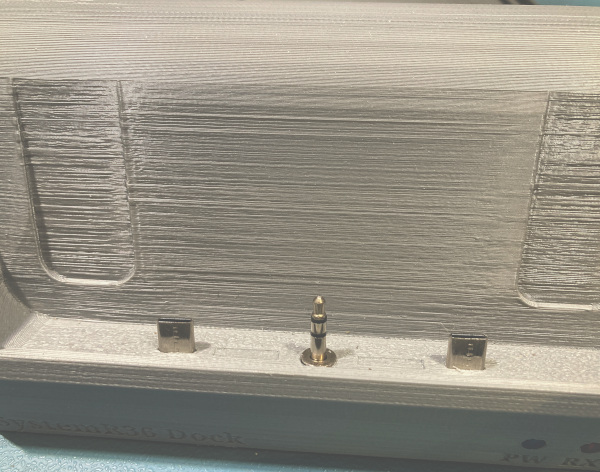
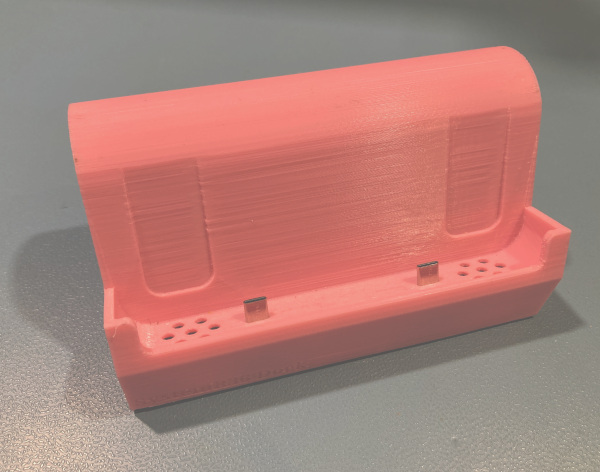
XNL R36 Dock Station
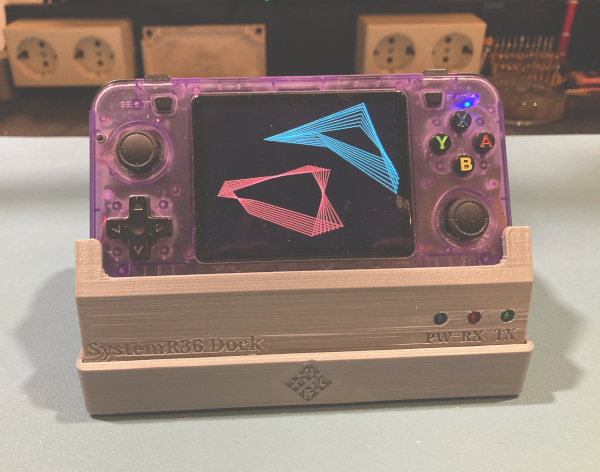
This project is a DIY R36(H) Dock Station, also known as the SystemR36 Dock.
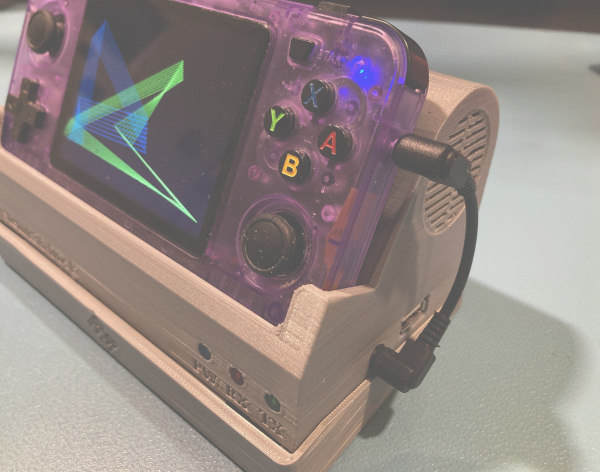
This dock station (depending on which features you decide to include in your build) includes the following features:
– Charging Port for the R36
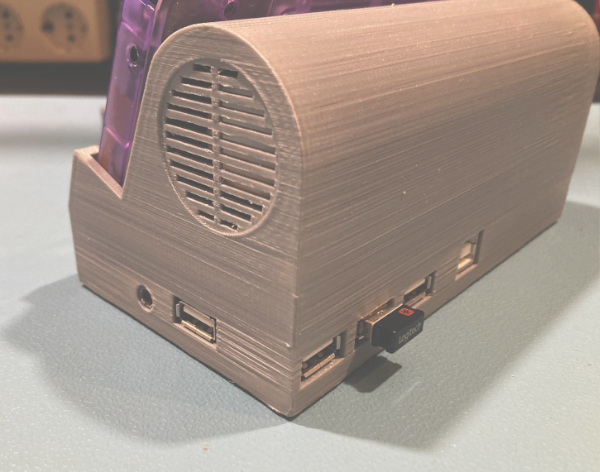
– 4 Port USB (A) Hub
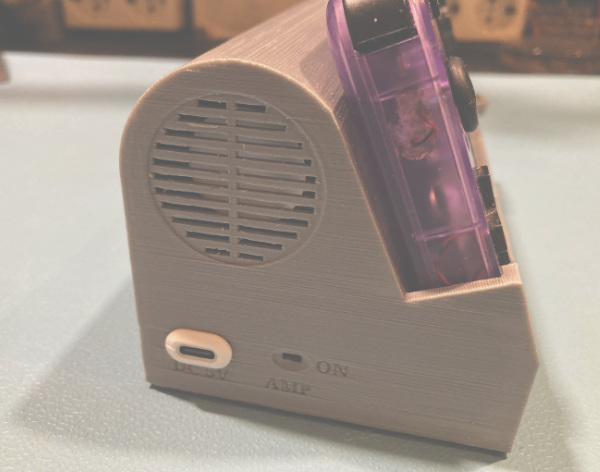
– Built-in amplifier + 40mm Stereo speakers
– Serial Port for the serial console
The USB hub and amplifier are externally powered and will not rely on the power delivery of the R36 its USB (OTG) port, and thus also not “stress-out” the R36 it’s (fairly weak) USB and power regulator circuits
For me this Dock Station is the PERFECT ‘companion’ during development of my R36 applications and distro, it’s also perfect match (even designed to be matched with) for the XNL R36 ModChip when using the serial port feature.
The entire project is HEAVILY documented with a step-by-step PDF with hand-drawn illustrations (no AI was used all for this project, which also includes it’s illustrations, documentation etc). Next to this I’ve also made a (simplified) video where I build my dock station(s) on YouTube, which you can find here: R36H DIY Dock Station Video
Download Size: 10MB
By clicking on the 'I Agree & Add to download basket', you confirm that you have read and agree to the License shown at the License tab.
Information
The XNL R36 Dock Station, or as I like to call it; the SystemR36 Dock, is a dock station which I’ve developed for my R36H units. I often use USB devices during development and testing of my R36 projects, mods and development of my distro (SystemR36). These devices for example include external audio devices, keyboards, mice, controllers, USB network cards etc etc. And as we all know by now, the USB (OTG) power delivery of the R36 is quite weak and can become quite problematic when you try to run multiple devices from it (especially when using an USB hub connected directly to the R36). Next to this I often used a janky setup where I mounted an mini camera arm to my keyboard, attached an ‘iPhone holder/clip’ to it and then put the R36 into that ‘setup’ during development (so that it basically is right in front of me all the time during development).
This ‘janky setup’ was far from ideal to be honest, and together with the issues I often had with the USB (OTG) port when I had my USB hub connected to simultaneously use my USB LAN Dongle and keyboard/mouse combi, it made me decide to develop a ‘proper’ R36 Dockstation.
This dock station can be built in different “configurations”:
– The full dock station, which includes the 4 Port USB hub, an built-in amplifier + two 40mm speakers and a 2.5mm TRS Jack serial port connector.
– The standard dock station, which has all of the above except the serial port implementation
– A basic dock station with only the 4 port USB hub, but doesn’t have the amplifier and serial port parts.
For these three builds I’ve also included three different top covers of the dock station to accommodate the chosen ‘modules’. You can of course always modify the STL files to make different combinations for your use case.
But you just said that USB Hubs can cause issues! So why include one in the dock then?!
Well good ‘question’; however, the USB Hub in the dock station isn’t powered by the R36 at all. The dock station has it’s own “USB-C” connector on the left side, and that is the DC input connector for the dock station. This port should be used to power the dock station via a decent 5V power supply (2A for example). This external power supply will then not only charge the R36, but it will also fully power the 4 Port USB hub independently and power the internal amplifier module (if you include it in your build). So all the power used by the devices in the USB hub of the dock station is supplied directly by the external power supply. More technically “advanced” explanation: Only the ground, Data- and Data+ of the USB Hub section are connected to the R36 it’s OTG port. The VCC is “directly” tied to the external power supply, meaning that the R36 is no longer responsible for delivering power to the USB Hub and it’s connected devices.
The Serial Port
The serial (debug) port has it’s own USB-B connector and also has it’s own independent power supply via this USB-B port. It’s NOT powered via the external adapter nor via the R36 its USB (OTG) port. It’s basically a separate device build into one device. This module/section of the Dock Station is based on the CH340G or CH340C (whichever you decide to use for your dock station), and this IC is driven/powered by the onboard LM3940 LDO. Which means that the serial port directly runs on 3.3V instead of the 5V from the USB port, this makes it perfectly safe to directly communicate with the RK3326 inside the R36 without first having to level-shift the RX and TX lines to prevent damage to the RK3326.
Is the R36S also supported?
Yes and no. The PCB of the R36 Dock is basically fully compatible to be used with the R36S, I just haven’t developed/designed any 3D files to make a decent dock station enclosure for the R36S units. And honestly, I currently don’t have any plans to do so either. IF you’re willing/going to design an enclosure for the R36S so it can use the same PCB (AND ALL FEATURES of the PCB!), then I might (if you like to of course!) decide to permanently include it in the download on my website for the XNL R36 Dock Station/SystemR36 Dock project (with credits to you for the STL files of course). It would then however include ALL features of the R36H dock version: The amplifier + stereo 40mm speakers with their OWN “sound chamber”, the 4 port USB hub, the on/off switch for the Amplifier and the serial jack on the right side.
Could I perhaps make the 3D files for the R36S version of the dock station?
Yes you can, and I might even add it permanently (with credits) to the project it’s download file(s), see information above for more information and the requirements.
What the hell!? When I have loud sounds like explosions, or a shotgun in Doom II for example, my external controller disconnects!
Yes! And that problem has been clearly explained in the datasheet/manual. Are you sure you really read the documentation while building it, or where you just winging it? 😉 But again then (in short): This is simply due to the extreme power draw/spikes the simple (low quality) amplifier boards used in this project can draw. It could be a combination of the power supply not being able to keep up, the amplifier spiking so much that the capacitors can’t keep up (“buffering”). AND due to the simple fact that I’ve kept the circuit relatively simple so that it is a easy as possible to build for as much people as possible. So I for example simply put didn’t included inductors to deal which such current spikes. MOST of the time the main issue when this happens is just due to the fact that the power supply can’t keep up though. If this problem is TOO big for your build, then you could try to mitigate it by increasing the large capacitor it’s value from for example 1000̇µF to 2200µF, or from 2200µF to 3300µF. And I would then (if possible) recommend trying to switch power supplies. For example using an 5V 3A power supply (those also often used for Raspberry Pi projects), those are often MUCH more stable than “just the regular USB adapter” or the “Chinese-PD-Adapter-Pretending-To-Be-An-Real-Powerhouse-USB-C-Adapters” 😉😂.
There is a (soft/annoying) hum coming from the speakers in the dock when my R36 is powered on!
Again: This is also explained in detail in the datasheet😉. This can happen depending on your R36 its revision, the board quality of the R36 etc. Just like the VERY well known problem with the R36S units when we would plug-in an USB WiFi dongle and we suddenly start hearing the annoying ticking sounds from the R36S it’s speaker, the same issue is (or COULD) cause this ‘dock station hum’ with the R36H units: Poorly designed low budget Chinese rip-off boards. Yes I said it! Even while I absolutely LOVE the R36 units, I won’t deny what they are: cheap low cost Chinese mass produced crappy designed boards😂.
However, have also explained in the datasheet (which is included in the download), that you can include two Audio Isolation Transformers (1:1) and place them between the jack plug from the dock going to the PCB. This will greatly reduce the hum and ‘erratic sounds’ coming from the R36/dock station.
The Acoustic Dock (without amplifier) sounds like sh*t!
Yeah, no sh*t Sherlock😉. Like mentioned in the documentation: The dock station is NOT designed to be a perfect acoustic case. The reason I’ve included one where it just has holes to ‘capture’ the audio coming out of the speakers of the R36 and just ‘yeet it’ into the hollow Dock is so that I still have SOME audio for an R36 which is not meant to play audio. I for example use the ‘acoustic dock’ for R36 units which are dedicated as home automation display/status panels or for R36 units which only show my security cameras their RTSP feeds. So if you are planning to use the dock for actual media playback or even gaming, then please do yourself a favor and DO NOT use the “Acoustic Dock” 😉.
Is it possible to use the dock station AND the Built-in Microphone Mod?
No sorry, it is unfortunately not possible to use “my microphone mod” when your R36 is docked into the dock station. This is simply due to the fact how the microphone mod works and how they (the R36 designers/manufacturers have messed up the design). You can learn more about this topic by watching the video about it the Microphone Mod, but the simple answer remains the same: When you build the dock station with built-in amplifier (and thus the 3.5mm Jack Plug), then it’s not possible to use the microphone while docked. If you would however make the ‘acoustic dock’ (the one without amplifier module built-in), then it would be possible to use it.
Warning: NO Support
It might sound a bit harsh, but I give absolutely no support or 'help' for this DIY Project. I make a lot of projects, of which most are just because I want to make something, I need something or need to solve a problem I personally have, and then later decide to make it so that it can be shared publicly. In my personal opinion, I already put A LOT more effort in making my projects sharable then lots of other YouTuber's for example. I often make VERY elaborate PDF's and/or blog-posts with custom drawn graphics to ensure that it's as clear as possible to understand and follow, tutorial video's on how to use or make my projects etc. And those (especially the documentation, extensive comments in my source-codes (if applicable) already cost A LOT of time to do, and that's basically what you will have to do with. My projects are intended as Do It Yourself, and the reason I'm sharing them (for free) is so that you can experiment with them yourself, benefit from my projects in your daily life, and possibly even learn from them. Those three are my main reason to share. I often mention this, and will mention it again: I do not make project for the content, I make content out of my projects. This is just a subtle difference when put to words, but the drive behind the projects is very different. At the moment I (finally) release a project, I often consider it 'done' (unless it's an ongoing active thing and thus otherwise stated) and I have moved on to the next one already. Chances are that when a project video finally is finished and released, that I have already been using that project for weeks if not months. And if I would have to start every single project full-time like I'm a corporate entity, then I just would not have enough time anymore to work on anything else. I hope and kinda expect that most will understand and respect this though😊. So It's NOT about me not wanting to help, but it's just the lack of hours in a day to be able to 😉😊
License
BY DOWNLOADING, INSTALLING, COPYING OR OTHERWISE USING THIS PROJECT, PRODUCT, FILES OR ANY PART THEREOF (AND THE RELATED DOCUMENTATION) FROM XNL FUTURE TECHNOLOGIES, YOU ON BEHALF OF YOURSELF, OR ON BEHALF OF ANY ENTITY BY WHICH YOU ARE EMPLOYED AND/OR ENGAGED AGREE TO BE BOUND TO THIS LICENSE AGREEMENT.
IMPORTANT
Do note that all sections/'chapters' bellow constitute the entire license and that they are 'interconnected'. This for example means that if there is a section about Closed Source/Binaries License, that this doesn't mean that the rest of the license doesn't to those binaries. It just means that that section is specifically aimed at those files, while the rest of the license (where applicable) is also 'in effect' for those binaries.
(Additional) License(s) in Project, Product or Download
This project, product, the files etc in this download/these download(s) contain (one or more additional) license(s).
When you download this project, product, files, download(s) etc, you agree that you will read the license(s) included in the download and it's files, projects, products etc and that you will delete 'the downloaded content' if you can't (or don't want to) agree to the included license(s).
These license(s) will most likely be present in one or more of the following ways:
- As license agreement/EULA window (in compiled software for example)
- As License 'embedded' into the documentation (like a datasheet for example)
- As additional license file which can be included into the Download (or archive file like a zip file).
- As as 'commented text' in source-code or as 'additional license file' in source code.
Don't worry, this license or these licenses will not be 'sneaky hidden' or hard to find, these licenses can be found in their expected or logical locations (as mentioned in the examples above).
Commercial Use Not Allowed
Commercial use of this project, product, the files, portions of it or the provided download(s) is not allowed.
This basically means that you can't use anything from this project, product, download(s) etc for commercial use.
Please note that 'Commercial Use Not allowed' does not only mean that you can't (re-)sell it, It basically means that you can't use this project, product, the files, portions of it or the provided download(s) for any commercial use and/or any financial gain.
Some other examples of commercial use which are not allowed are:
- Using (parts of) the project, product, the files, code etc (from here on summarized as product) in or for your own work(s) which you intend to sell.
- Selling services which require use of this project, file(s), code etc and thus basically charging your customers for use of this 'product'
- Renting out this product/project or parts of it
- Selling "compilation disks, download, packages" etc which include this project/product and/or portions of it
- Putting this project/product and/or parts of it behind a paywall on your own website(s) and/or platforms (either altered or unaltered)
Because we think that the "Standard No Commercial Use Allowed Clause" can be a bit vague or even a pitfall in some cases, we've decided to exclude certain situations from our 'Commercial Use Not Allowed Clause', hoping that it will be a bit easier for people to understand what they can and can't do with the projects, products, files, models etc which are tied to our "Commercial Use Not Allowed Clause"
Excluded from this "Commercial Use Not Allowed" clause are:
- Using, showing, demonstrating, educating with etc this project, product, the files, portions of it or the provided download(s) in vlogs or in/on blogs (which in could be considered commercial use by some)
- Using this project, product, the files or portions of it internally in your business (either to make profit with it or just as 'tool'). Do however note that this type of use (obviously) comes without ANY acceptance of liability from XNL Future Technologies. And thus that using it for situations where your business (/income) might depend on it, on it's existence and/or (future) availability is 100% at your own risk. These are just intended as DIY projects and do not classify as business grade releases!
- If this project/product is for example a 'software package/suite', you are allowed to install it for customers (upon their request) and charge your own 'installation fee' for this (because you are charging for your time/service). You are however not allowed to offer a special installation service for this project/product specifically on your website or to your customers, neither are you allowed to actually charge your customers for this project, product, the files, portions of it or the provided download(s).
- If this project/product is for example a '3D Statue/model' and someone asks you to print it for them, you are allowed to print it and charge your customer for the material(s), power consumption and your time. You are however not allowed to specifically charge your customer for this particular model or offer this model as 'printable product' (either on it's own or as a 'model package').
- In case of a Printable 3D Statue/Model you are also allowed to charge customers for your time, paint and 'artistic work' if you are requested to paint it for one of your customers. Keyword here is: Requested. You are for example not allowed to offer this model/statue in your store as 'order this model painted as you like'.
No Redistribution Allowed
It is not allowed to redistribute this project, product or the files included in the download(s) in any way (either altered or unaltered). This means that you are not allowed to share or (re-)upload any of the files which you can download from this project, product, tutorial etc.
If other portions of this license state that you can use/redistribute certain parts of this download (for example: snippets, examples from a source code, or specific files etc), then those specific 'items' are exempt from the 'No Redistribution Allowed' rule.
If you need to make this project, product or files available to others (for example visitors of your blog), then you should provide them with a direct link to this page instead of 're-uploading' them to your own blog/website for example.
Logo & Branding Copyright
XNL Future Technologies™, XNL TV™, XEWA™, TeamXNL™, SystemR36™, System166™, The XNL Ft logo, The XNL Future Technologies logo, The XNL TV logo, The E-Series "Flamingo Logo", The XNL E-Academy Logo, The Overkill Edition Logo, The XEWA logo, The SystemR36 Logo, The System166 Logo, The Sophie The Pigeon 8-Bit logo and others are trademarks or registered trademarks of XNL Future Technologies in The Netherlands and other countries. Other terms, project, product or brand-names and/or logo's may be trademarks of others.
XNL Future Technologies is not associated and does not claim to be associated with any company or product that might have been mentioned in their documentation unless explicitly stated otherwise.
Legal & Disclaimer(s)
SIMPLIFIED DISCLAIMER:
The use of our projects, products, schematics or other files is at your own responsibility and they are provided “AS-IS”, without ANY WARRANTY. Use of the content on or from our website(s) is 100% at your own risk. Please realize that most of the 'stuff' that we offer on our website is intended for the enthusiasts, and thus it is designed/meant to be adapted, expanded or adjusted for use in 'larger' projects. Or that it is meant as a basic guideline to get started on a project of your own. Some products that we used (or have used) internally in our company will be shared with the public so that others can enjoy these modules or products also. For all these projects, product, files etc goes: USE AT OWN RISK! Some projects or products that we use internally do not have build in security measures (like reverse polarity protection for example!), this is to keep the costs at internal (test) stages as low as possible or due to the fact that the product is intended to be used in only one particular way! Keep this in mind when using, building or even buying these projects or products. If you're not sure what you're doing or if you don't trust a certain product, schematic, sample or anything else: USE YOUR INSTINCT and DO NOT CONTINUE, If you DO want to continue working on or with the project, product, source-code, sample, printed circuit board, model, schematic etc: Again: AT YOUR OWN RISK. The same goes for using our software (either closed source or other included binaries): USE A YOUR OWN RISK.
OFFICIAL DISCLAIMER:
THE SOFTWARE, PROJECTS, SCHEMATICS, INFORMATION, SOURCE CODE, SAMPLES, FILES, 3D MODELS AND PRODUCTS ARE PROVIDED "AS IS", WITHOUT WARRANTY OF ANY KIND, EXPRESS OR IMPLIED, INCLUDING BUT NOT LIMITED TO THE WARRANTIES OF MERCHANTABILITY, FITNESS FOR A PARTICULAR PURPOSE AND NONINFRINGEMENT. IN NO EVENT SHALL XNL FUTURE TECHNOLOGIES BE LIABLE FOR ANY CLAIM, DAMAGES OR OTHER LIABILITY, WHETHER IN AN ACTION OF CONTRACT, TORT OR OTHERWISE, ARISING FROM, OUT OF OR IN CONNECTION WITH THE SOFTWARE, PROJECTS, SCHEMATICS, INFORMATION, SOURCE CODE, SAMPLES, PRODUCTS OR THE USE OR OTHER DEALINGS IN THE SOFTWARE, PROJECTS, SCHEMATICS, INFORMATION, SOURCE CODE, SAMPLES AND PRODUCTS. XNL FUTURE TECHNOLOGIES ASSUMES NO LIABILITY WHATSOEVER AND DISCLAIMS ANY EXPRESS, IMPLIED OR STATUTORY WARRANTY RELATING TO ITS SOFTWARE, PROJECTS, SCHEMATICS, INFORMATION, SOURCE CODE, SAMPLES AND PRODUCTS INCLUDING, BUT NOT LIMITED TO, THE IMPLIED WARRANTY OF MERCHANTABILITY, FITNESS FOR A PARTICULAR PURPOSE, OR NON-INFRINGEMENT. IN NO EVENT SHALL XNL FUTURE TECHNOLOGIES BE LIABLE FOR ANY DIRECT, INDIRECT, CONSEQUENTIAL, PUNITIVE, SPECIAL OR INCIDENTAL DAMAGES (INCLUDING, WITHOUT LIMITATION, DAMAGES FOR LOSS AND PROFITS, BUSINESS INTERRUPTION, PERSONAL INJURY OR DEATH, MATERIAL, OR LOSS OF INFORMATION) ARISING OUT OF THE USE OR INABILITY TO USE THIS DOCUMENT EVEN IF XNL FUTURE TECHNOLOGIES HAS BEEN ADVISED OF THE POSSIBILITY OF SUCH DAMAGES. XNL Future Technologies makes no representations or warranties with respect to the accuracy or completeness of the contents of this publication and reserves the right to make changes to specifications and product descriptions at any time without notice. The information contained herein may be of a preliminary or advance nature and is subject to change without notice. No license, whether express, implied, arising by estoppel or other-wise, to any intellectual property rights is granted by this publication. XNL Future Technologies software, projects, schematics, information, source codes, samples or products are not designed, intended, authorized or warranted for use in or as systems for applications intended to support or sustain life, or in any other application in which the failure of XNL Future Technologies software, project, schematics, information, source code, model, sample, files or product could create a situation where personal injury, death, or severe property or environmental damage may occur. XNL Future Technologies products, projects or samples are not designed nor intended for use in weapon systems, this applies to offense and defense systems. XNL Future Technologies projects and products shall never be used to cause harm to living creatures including but not limited to humans and animals. XNL Future Technologies projects and products shall never be used to cause damage to property of any kind. Any use of XNL Future Technologies projects or products to cause harm, death or damage in any kind is strictly prohibited.
XNL Future Technologies reserves the right to discontinue or make changes to its projects, products or files at any time without notice.
SAFETY-CRITICAL, MILITARY, LIFE SUPPORT, MEDICAL AND AUTOMOTIVE APPLICATIONS DISCLAIMER: XNL Future Technologies products, projects, samples, source-codes, documentation, tutorials, software or any other content is not designed for and will not be used in connection with any applications where the failure of such would reasonably be expected to result in significant personal injury or death (“Safety-Critical Applications”). Safety-Critical Applications include, without limitation, life systems or devices, health (monitoring) equipment, safety or security systems, equipment or systems for the operation of nuclear facilities or other “large impact” facilities. XNL Future Technologies products, projects, samples, source-codes, documentation, tutorials, software or any other content is not designed nor intended for use in government, military or aerospace applications or environments or in any other “high-risk” facility, location or environment.
PCB Order Instructions
This section explains the (recommended) ordering process and settings (at the PCB manufacturer) to order our circuit boards using our provided 'ready-to-use' Gerber (zip) files. We will first give a basic overview for the recommended PCB Manufacturer settings, so that the more experianced users can instantly find what they need, and after this 'settings overview' we will explain more in-depth how you can order our printed circuit boards (PCB's) using the files you can download for our projects, products and packages.
NOTE: The clickable links to JLCPCB are referral links, more information about this at the bottom of the page.
Recommended PCB Ordering Settings (Material, layers etc)
All our boards (unless otherwise stated) are designed for and should be ordered with the following settings:
(Base) Material: FR4
Layers: 2 Layer / Double-sided
PCB Thickness: 1.6mm
PCB Color: Choose whatever you like or stick to the 'official project/product color' 🙂
Outer Copper Weight: Use default of the website you're ordering (often 1oz).
When ordering from JLCPCB and using the zip file which has (JLCJLCJLCJLC) in it's name:
Remove Order Number: Click on [Specify a location]
How to use our files/downloads to order the circuit boards
To order the printed circuit board(s) included in this project, product or package you will first need to download and extract this project or product.
Our project and product folders will often contain several folders/directories, of which one of them should have a name similar to 'Gerber Files (For Ordering-Production)'. If the downloaded project or product only contains one printed circuit board (PCB) then you will often find two archives (zip files) within this folder.
One of these archives will have (JLCJLCJLCJLC) in it's name and the other won't, for example:
ProjectXNL.zip
ProjectXNL (JLCJLCJLCJLC).zip
NOTE: You will only need to use one of these files when ordering, not both. So please read along to find out how this works 🙂
My 'Gerber Files Folder' contains even more folders
If this is the case it just means that the project, product or package you have downloaded consists out of multiple circuit boards (or options/variations you can choose from), you should consult the documentation (or included text file(s) in these folders) of your project, product or package to find out which folder (or PCB's) you will need. Inside each folder for the different Printed Circuit Boards in the project, product or package we will still use the same 'file structure' where there will be two files per PCB (one having '(JLCJLCJLCJLC)' in it's name and the other doesn't).
My Gerber Files Folder only contains one zip file (per part/option)!
This is also a possibility, this just means that we did not created an additional 'Gerber file-set' with PCB's which have JLCJLCJLCJLC on them. We often choose to do this for boards which would be to small to actually place such texts, we will then just let it be up to JLCPB to place the production/batch numbers on them. So if there aren't additional zip files which have (JLCJLCJLCJLC) in their filename(s), then you should just use the zip file(s) which is present in the folder(s).
File difference explanation
- The one which has "(JLCJLCJLCJLC)" in it's file name will have JLCJLCJLCJLC printed on the circuit board.
- The one which does not have "(JLCJLCJLCJLC)" in it's name will not have JLCJLCJLCJLC printed on the circuit board.
Ordering anywhere else than JLCPCB
When you want to order anywhere else than on JLCPCB.com you should always just use the zip file which does not have (JLCJLCJLCJLC) in it's filename.
What does this JLCJLCJLCJLC on the PCB mean?
Well this 'piece of text' tells JLCPCB where they can/should place their (internal) manufacturing/production/batch numbers, which they use for handling your order internally. JLCPCB offers a free service where circuit board designers can specify where JLCPCB can place their 'internal batch/production numbers', this prevents issues where they would for example (accidentally) place these production/batch numbers on an ugly location and thus possibly ruin your 'precious silkscreen artwork' 🙂
Ordering from JLCPCB
When you do want to order at JLCPCB.com you have two options to choose from:
- Pay a bit extra on your order (currently around $1.54) and have JLCPCB remove their manufacturing/production code completely, in which case you should use the file which does not have (JLCJLCJLCJLC) in it's filename.
- Or instead use the file which does have (JLCJLCJLCJLC) in it's filename, in which JLCPCB will use the by us specified location to place the manufacturing/production/batch number(s). We will always (try to) place this text in the least noticeable location or where it would not 'mess' with the rest of our silkscreen design. To be extra clear: When using this option you will have a small 'batch number' printed on the location of your PCB's where we had placed the "JLCJLCJLCJLC marker", but it will save you a bit of money on your order.
IMPORTANT:
If you are ordering from JLCPCB and you are using the zip file which has (JLCJLCJLCJLC) in it's name, then you have to make sure that you search for the 'Remove Order Number' option when ordering your PCB and then select [Specify a location] at this option. Otherwise you might still end up with an 'factory batch number' on your PCB AND have the 'text' JLCJLCJLCJLC printed on it. So make sure that you select [Specify a location]
Price estimate at JLCPCB
Currently (at the time of writing this 'pre-configured order manual template') prices at JLCPCB per PCB Design are around 2$ to $4 if the board is 100x100mm or less, which will get you 5 copies of the board itself for this price. And if you order 10 of the same board you will often just have to pay $5 (so just $1 more for 5 extra boards). We use JLCPCB for nearly all our projects and products and we are very satisfied with their quality and production times. Ordering from JLCPCB is as simple as going to JLCPCB.com then 'drag-and-drop' your zip file (with the Gerber files) onto the page.
NOTE: The clickable links to JLCPCB in this section are referral links
PCB Sponsor Update/Referal Link Information:
Since July 2024 JLCPCB is now sponsoring my projects, platform and YouTube channel, I'm very grateful for JLCPCB offering to sponsor me (they actually contacted me, I did not contacted them). Despite the fact that they are now sponsoring my/our projects, my opinion about them remains unchanged and will also state that my recommendation to use JLCPCB is 100% my own. If I would not have used (and loved) their service that much myself already I would not have accepted their offer either. The reason I accepted their sponsor offer is because I had already been using them for many years with great satisfaction.
If you click on the referral link I will NOT be able to see that you have clicked it (I will not get any user or order details from them), and neither would you pay more when using their link for example. Using the referal link does however support my projects, content and platform 🙂
You can also use JLCPCB for FR-4 boards up to 20 layers, Flex pcb's and assembly of your PCB's (meaning they will put the components on them for you, I personally haven't used the latter (yet) though).
Bill Of Materials
Usually I place a detailed list with components needed to build my projects, however, this is a ‘multiple-build-options-project’. Meaning that the components needed heavily depends on which modules you include or not. Due to this I would strongly recommend that you for this project just download the project files and check the datasheet which shows the exact components needed per option/module.
For a quick overview I did included all options as ‘small lists’ here, but again: highly detailed information about this can be found in the datasheet.
IMPORTANT NOTE: The components add-up per module you decide to include. So if one section for example says 2x 100nF, and another list would say 3x 100nF then the total needed to include both modules/options would be 5x 100nF capacitors.
Needed for ALL types of builds:
1x Female USB-C Socket “Two-wire Snap in”
1x Male USB-C With USB 2.0 PCB
1x XNL R36(H) Dock Station PCB
2x 100nF Ceramic
2x 2x1M Male Pin Header
Needed for the 4 Port USB Option
1x SL2.1A USB 2.0 4-port Hub IC
6x 100nF Ceramic Capacitor
2x 10μF Ceramic Capacitor
4x 10μF Electrolytic Capacitor
1x Male USB-C With USB 2.0 PCB
1x 3x1M Male Pin Header
4x Female USB A Connector Berg- PN8752
Needed for the Amplifier + Speakers option
2x 3×1 Male Pin Header
6x 2×1 Male Pin Header
1x 100nF Ceramic Capacitor 0805
1x 1000-2200μF Electrolytic Capacitor
6x 100nF Ceramic Capacitor
1x PAM8403 Audio Module
2x 40mm 3W 4Ohm Speaker
1x Mini Slide Switch 1P2T SS12D00 3mm
1x 3.5mm TRS Jack Connector
2x 600:600 Ohm Audio Transformer (optional but HIGHLY recommended!)
Needed for the Serial Port Option
1x Berg USB B Female Connector4 PN61729-S (Basically the standard USB-B connector)
1x LM3940 3.3V Regulator (LDO) SOT-223
1x 100nF Ceramic Capacitor 0805
1x 470nF Ceramic Capacitor 0805
3x 1K Resistor 0805
1x 4×1 Male Pin Header
3x 5mm LED’s to color of choice
1x CH340G or CH340C2 SOIC16 (SMD/SMT)
1x 12MHz Crystal2 HC-49/US*
1x 22pF Ceramic Capacitor 0805 (SMD/SMT)*
1x 2.5mm Female TRS Jack SMT Connector3 Model/Type: PJ-242
1x 33μF Electrolytic Surface Mount Capacitor
* The 22pF ceramic capacitors and the 12MHz crystal are only needed if you use the CH340G. If you’re using the CH340C, then you don’t need these two capacitors and the crystal.
Project/Product Sponsor(s)
For full transparency I always clearly state when a project (or parts of it) are/have been sponsored.
For this particular project the PCB production was sponsored by JLCPCB, which made it amazingly easy (and fast!) to produce both the test version(s) of the R36 boards and the final versions. This was a ‘multi project’ sponsorship for both the XNL R36 ModChip, the Dock Station PCB and another (upcoming) project.
Special thanks to JLCPCB for this opportunity.
Get your own PCB’s super cheap from JLC PCB as low as $2 without absurdly high minimal order requirements 😊 via JLCPCB.com (referral link)
Only logged in users who have downloaded this project/product can leave a review.
Reviews
There are no reviews yet, be the first one to add a review.